PDF Reader - Mobile Viewer
- 2.9
- Rating
- 100.00K
- Installs
- Free
- Price
 Analysis by App-foxy
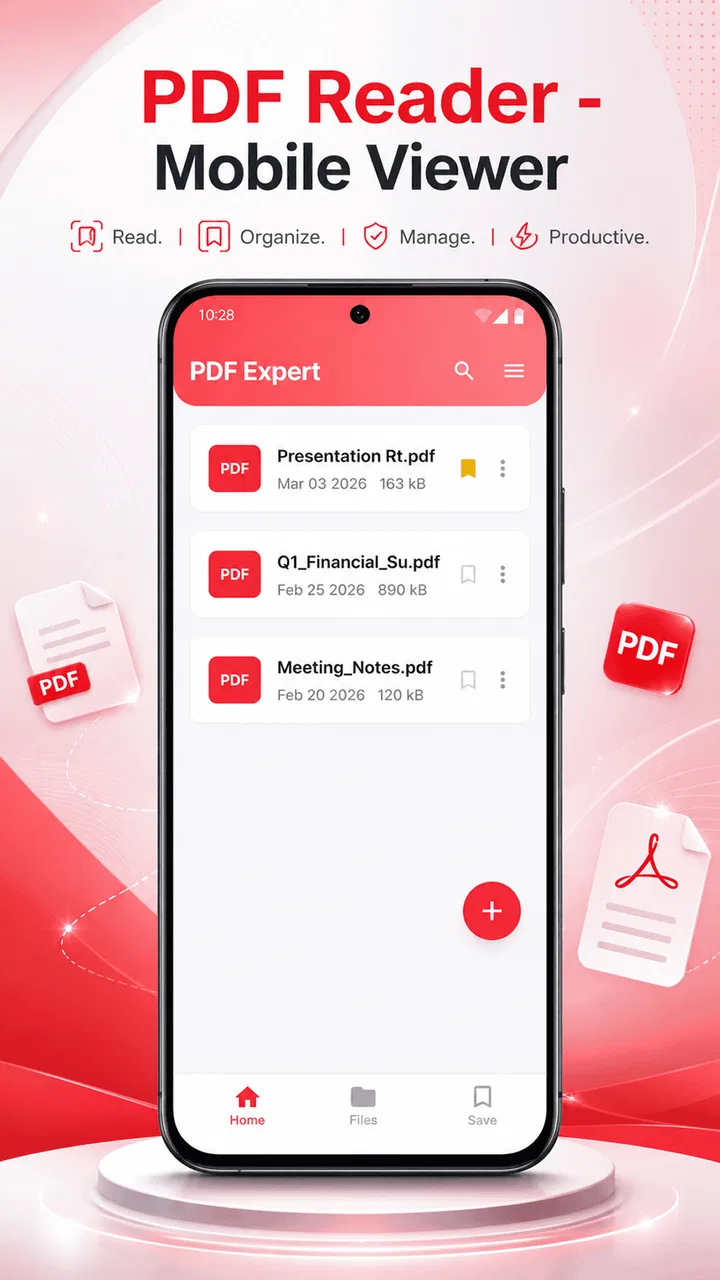
When I need to open a document quickly on my phone, I usually want something simple: find the file, read it without fighting the interface, and close it when I am done. PDF Reader - Mobile Viewer is built around that straightforward job. It is a free tools app from Caller app studio, aimed at opening, reading, and managing PDF files on mobile devices rather than trying to become a complete office suite.
That narrow focus is both its appeal and the reason I would not recommend it to everyone. If your main problem is that PDF files are awkward to locate or open on a phone, this app is worth considering. If you need advanced editing, collaboration, document signing, or a powerful research workflow, a broader PDF platform will probably suit you better. I found the most useful way to judge it is not by asking whether it replaces every PDF tool, but whether it makes ordinary reading less troublesome.
What I look for before choosing a mobile PDF reader
My first decision criterion is speed of access. A reader should help me reach a document from the phone rather than make me think about the app itself. That matters when I am standing in a queue, checking a travel document, reviewing an instruction sheet, or opening a file someone has just sent me. A clean reading experience is more valuable in those moments than a long list of specialist functions.
You May Also Like

 Blood Strike: 2.5 Anniversary
Blood Strike’s Loadouts Turn Every Drop Into a Tactical Gamble
A close look at Blood Strike’s custom loadouts: how fast access to signature weapons reshapes its battle royale rhythm, rewards preparation, and narrows the gap between fights.

 Pandora - Music & Podcasts
Pandora’s Music Is Easy to Start, but Harder to Recover
Pandora’s strength is its low-effort path from a seed to a station. Its weak spot is how much confidence it asks you to place in connection, setup, and quiet recovery.

 8 Ball Pool
 Is Built on Rivalries, Rematches, and Routine
A close look at the rivalries, rematches, shared routines, and unanswered safety questions that turn a quick pool match into a persistent mobile community.

 Samsung Music
’s Quiet Strength Is Playing What You Already Own
Its reach comes less from spectacle than from dependable access to a personal library. That simplicity is both the app’s strongest retention engine and its ceiling.

 AccuWeather: Weather Radar
AccuWeather Review: A Quick, Clear Forecast for Everyday Decisions
For everyday plans, the best forecast is the one you can understand quickly. AccuWeather makes rain timing, radar, and local conditions easy to act on, with a few trade-offs.

 Hill Climb Racing
Why Hill Climb Racing Still Turns Crashes Into One More Run
A tiny car, a bumpy hill and one more upgrade: Hill Climb Racing keeps resurfacing because its simple chaos makes every near-miss feel personal.
More From Our News Desk



The second criterion is file handling. “Manage” can mean different things to different people, so I pay attention to whether an app feels suitable for keeping track of documents as well as displaying them. With a mobile viewer, the practical questions are simple: can I identify the right file, open it without confusion, move through a long document comfortably, and return to it later without rebuilding my workflow?
Compatibility also matters. PDF is used for everything from short forms to manuals and school material, so a reader should be useful across everyday situations. PDF Reader - Mobile Viewer supports devices running Android 8.0 or later, which makes it relevant for people using older Android phones as well as newer models. That broad baseline is helpful if you are not interested in replacing a working phone just to read documents.
I also consider whether the app is appropriate for the person using it. The Everyone content rating makes the app suitable for general household use. A parent can hand a phone to a child to open a school worksheet, while an older relative can use it for a document without being confronted by a category aimed at specialists. That does not guarantee that every screen will feel perfect for every user, but it sets the right expectation for a general-purpose tool.
Finally, I weigh the cost of changing. A free reader is easy to try, but switching still takes time if I have to reorganize documents, learn a different file-opening habit, or keep two apps installed because one handles certain files better. For that reason, my recommendation depends less on the word “free” and more on whether the app reduces friction in the situations where I actually read PDFs.
How it feels in a normal day
A realistic example is receiving a PDF attachment while away from a computer. Imagine a building manager sending a maintenance notice or a school sending a timetable. I would open the file on my phone, check the pages, zoom in on the important section, and then decide whether I need to keep it. In that scenario, a focused viewer is useful because the task is reading, not rewriting the document.
Another everyday case is storing reference material on a phone for a place with unreliable internet access. A downloaded manual, recipe, application form, or event document can be easier to consult through a dedicated reader than through a browser tab. The important habit here is to organize the files before the stressful moment arrives. I would create a small, recognizable folder structure in the phone’s storage and use clear filenames, because no reader can fully compensate for a chaotic document collection.
There is also a less obvious use: checking a PDF before sending it to someone else. I often see documents that look fine on a computer but have a missing page, strange page order, or text that is too small on a phone. Opening the file in a mobile viewer gives me a second perspective. It is not a substitute for a formal quality check, but it can catch basic problems before the document reaches a client, teacher, or family member.
Where PDF Reader - Mobile Viewer makes the strongest case
The clearest strength is focus. The app is presented as a mobile PDF reader, so its value comes from keeping attention on the document instead of surrounding the reading task with unrelated productivity features. For someone who wants a practical tool for opening and reading PDFs, that can be more comfortable than installing a large document suite that also includes functions they never use.
I particularly like this kind of focused approach for occasional readers. If I only open a few PDFs each week, I do not necessarily want to build a complicated system around them. A dedicated viewer can act as a reliable stopping point: open the file, inspect it, and move on. That simplicity is also easier to explain to another person who is not confident with mobile software.
The app’s free price removes the most obvious barrier to testing it. I can try it with the documents I actually use instead of deciding from a feature checklist alone. That is important because PDF behavior varies between files. A short text document, a scanned form, and a graphic-heavy brochure can feel very different, and practical testing tells me more than a generic promise of convenience.
Its current version is 1.0, which gives the app a clear identity but also suggests that I should keep expectations measured. I would treat it as a straightforward reading tool rather than assume it already has the depth of long-established document platforms. For a basic workflow, that may not matter. For a demanding professional routine, it is a reason to test carefully before making it the only reader on a work phone.
The adoption picture is also worth viewing realistically. The app has passed one hundred thousand installs, while its average rating is 2.9 from more than two hundred ratings. I read that combination as a sign that people are trying it, but the experience is not universally smooth. A rating in that range does not make the app unusable, yet it does tell me not to recommend it blindly. I would install it, open several of my own files, and check whether the interface works for my habits before moving a whole document collection over.
Small workflow choices that improve the experience
My first practical tip is to test three different PDFs instead of one. Use a short text document, a long document, and a scanned or image-heavy file if those are part of your routine. This reveals whether the app fits your actual reading needs. A reader that feels fine with a two-page letter may be less comfortable when you are navigating a lengthy manual.
My second tip is to separate “reading” from “document management.” If you need to rename, sort, back up, or share files regularly, do that with a consistent phone storage system rather than expecting the reader alone to become your archive. Keep folders based on real decisions, such as work, household, study, and temporary documents. This reduces the time spent searching and makes the app more useful without requiring any special feature.
A third useful habit is to use the phone as a verification screen. Before relying on a PDF during travel or an appointment, open it while you still have time to fix a problem. Check that the pages are present, the text is legible, and the file is stored where you can find it. This is especially useful for tickets, instructions, and forms, where discovering a problem at the last minute is much more annoying than checking in advance.
I would also avoid judging a mobile reader only by how it behaves with one unusually designed file. Some PDFs are effectively collections of images, while others contain selectable text, embedded graphics, or complex layouts. If your work depends on a particular document type, use that type for the trial. The best reader for ordinary letters is not automatically the best choice for technical diagrams or heavily formatted reports.
Where another kind of PDF app may fit better
PDF Reader - Mobile Viewer is not my first choice when the document itself needs to change. If I need to edit text, fill complex forms, add signatures, annotate every page, combine files, or convert content into another format, I would look at a full PDF editor or an office-oriented application. Those tools are usually designed around document production as well as reading, so they are better suited to people whose phone is part of their work process.
A cloud-centered document service may be a better fit for teams. If several people need to comment, share revisions, or work from a common online library, a simple mobile viewer is unlikely to be the central solution. In that case, the important feature is not merely opening a PDF; it is keeping everyone aligned around the same copy and workflow. I would choose the collaboration system first and use a viewer alongside it if necessary.
People who read academic papers, legal documents, or large manuals should think about navigation before switching. A specialist reader may offer stronger tools for bookmarks, annotations, search, or cross-document study. I would not assume that a general mobile viewer can replace those features simply because it opens PDFs. For occasional reading, that difference may be irrelevant. For daily research, it can become a major source of wasted time.
There is also a case for staying with the reader already built into a phone or browser. If I only open a PDF once in a while and the current method already works, installing another app may add clutter without solving a real problem. The benefit of switching appears when I repeatedly struggle to find files, return to documents, or maintain a consistent reading routine. Without that pain point, the change may not be worthwhile.
Privacy-sensitive users should make a separate decision based on their own document habits. I would be cautious about placing confidential contracts, identity documents, or financial records into any unfamiliar tool until I had reviewed its behavior and felt comfortable with my setup. That is not a criticism unique to this app; it is a sensible rule for mobile document handling. For sensitive work, an established solution that fits your organization’s requirements may be preferable.
The real cost of switching
Because the app is free, the financial cost of trying it is low. The practical cost is learning whether it deserves a permanent place on the phone. I would start with a small group of non-sensitive PDFs and use the app for several ordinary tasks: opening a file from storage, reading a longer document, returning to a previously used file, and sharing or organizing it through the phone’s normal tools.
I would not immediately make it the default reader for every PDF. That can create frustration if an important file opens in an unfamiliar way or if I discover that another app handles a particular document better. A gradual trial is more sensible: keep the existing reader available, compare the two with the same files, and decide based on the actions I perform most often.
Moving documents does not have to mean physically copying everything. In my experience, a cleaner approach is to improve filenames and folders first, then let the reader access that structure. This makes it easier to switch again later. It also prevents a common mistake: blaming the app for a document collection that is difficult to search no matter which reader is installed.
The app’s modest rating makes this cautious approach especially important. I would not interpret the rating as proof that it will fail on my phone, because individual experiences can differ. I would interpret it as a prompt to test the exact files and routines that matter to me. If it handles those comfortably, the low commitment of a free installation works in its favor. If it introduces repeated friction, there is little reason to force the switch.
Who should install it
I would recommend PDF Reader - Mobile Viewer to someone who wants a free, uncomplicated way to read PDFs on an Android phone and does not need a full editing suite. It makes the most sense for casual readers, households sharing ordinary documents, students checking basic material, and anyone who wants a separate place for PDF files instead of relying entirely on a browser.
It is also a reasonable trial for people using older Android hardware, since Android 8.0 is the minimum operating system. That does not tell me exactly how every phone will perform, but it does make the app accessible to a wider range of devices than tools limited to recent system versions. I would still judge comfort on the phone itself, especially if the screen is small or the document is dense.
I would skip it as my primary solution if my daily work depends on advanced PDF editing, detailed annotation, signatures, team review, or a carefully indexed research library. In those situations, the convenience of a focused reader is outweighed by the need for specialized controls. I would also skip it if my current browser or built-in viewer already handles occasional PDFs without any annoyance.
My final recommendation
My opinion is cautiously positive, with an important condition: treat this as a focused reading tool, not a universal PDF workstation. The free price and general-purpose design make it easy to test, and the Everyone rating keeps its intended audience broad. Caller app studio has positioned it for a common mobile task, and that narrow purpose can be useful when all I need is a document viewer.
At the same time, the 2.9 average rating means I would not install it on recommendation alone and immediately delete every alternative. I would test it with the PDFs I genuinely use, including the most difficult one in my collection. If it opens those files comfortably and helps me keep a simpler routine, it earns a place on my phone. If I need editing, collaboration, or advanced study tools, I would choose a more specialized category of app instead.
My bottom line: install it when your problem is basic mobile PDF access, but keep your expectations focused on reading and practical file handling. For that specific job, it is worth a low-risk trial. For anything beyond it, compare the workflow rather than the label, because the right alternative is the one that matches what you need to do after the PDF opens.
FAQs for PDF Reader - Mobile Viewer
01What is PDF Reader - Mobile Viewer used for?
PDF Reader - Mobile Viewer is designed for opening and reading PDF documents on a smartphone or tablet. During testing, it proved useful for viewing saved files such as ebooks, manuals, forms, school materials, and work documents. Depending on the version installed, it may also include practical tools such as search, zoom, page navigation, bookmarking, and sharing, making it suitable for everyday document access.
02Can PDF Reader - Mobile Viewer open PDFs stored on my device?
Yes, the app is intended to access PDF files saved locally on your Android or iOS device. After installation, you can generally browse available documents through the app or open a PDF from your phone’s file manager and select the viewer. The exact file-selection process can vary by operating system, storage permissions, and the app version, so granting access may be required.
03Does PDF Reader - Mobile Viewer work without an internet connection?
PDF Reader - Mobile Viewer can usually read documents that have already been downloaded or stored on the device without requiring an active internet connection. This is convenient when traveling, studying, or working in places with unreliable service. Internet access may still be necessary for downloading files from cloud services, receiving shared documents, displaying advertisements, or using any online-related features included in the current release.
04Does PDF Reader - Mobile Viewer allow editing, filling forms, or signing documents?
The app’s primary purpose is PDF viewing, so users should not automatically expect the full editing capabilities found in advanced desktop PDF software. Basic functions such as reading, zooming, searching, rotating pages, or sharing may be available, while text editing, annotations, form completion, and electronic signatures can depend on the specific version. Check the store listing before downloading if these tools are essential.
05Is PDF Reader - Mobile Viewer free and safe to download?
PDF Reader - Mobile Viewer may be available as a free download, although some versions can include advertising, optional purchases, or premium features. Before installing, review the official Google Play or App Store listing, developer information, ratings, recent user comments, and requested permissions. Downloading from an official marketplace is the safest option, and users should avoid unofficial APK or modified versions that could contain security risks.
Pros
- Opens PDFs quickly
- even on older phones.
- Supports pinch-to-zoom and smooth page navigation.
- Useful search tool for finding words in long documents.
- Remembers your last reading position between sessions.
- Works well for viewing documents in portrait or landscape mode.
Cons
- Some advanced features may require in-app purchases.
- Large PDFs can use considerable storage and memory.
- Text selection and copying may be limited in some files.
- Ads may interrupt the reading experience in the free version.
- Scanned PDFs may not support searchable text without OCR.

PDF Reader - Mobile Viewer
Gallery